The agentic video editorfor demos & guides
Upload a raw screen recording. Stepio's AI agent cleans the voiceover, cuts the dead air, and writes the step-by-step guide, in 47 languages. No scripts, no retakes, no editing.

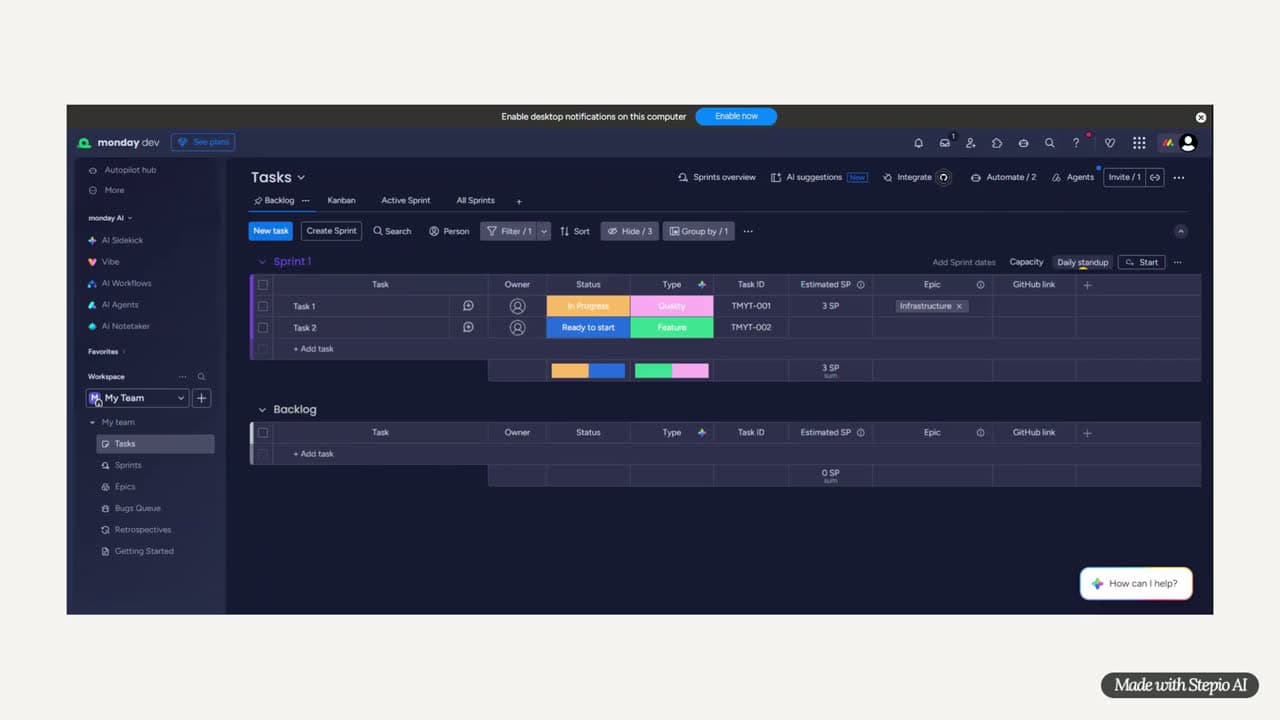
Stepio changed our workflow overnight. We're producing high-quality tutorial videos 20x faster than our old manual process.

Studio-quality video
in four simple steps
From raw recording to share-ready link, Stepio handles every step in between.
Record or upload a video
Record your screen directly in Stepio, or upload any existing video, raw footage, or slide deck.

AI edits it for you
Stepio cleans up your script, generates a natural voiceover, and improves every frame automatically.
Edit and customize
Change the voice, reorder segments, or adjust visuals. Everything stays editable in one simple editor.
Export and share
Download your video, embed it in your product, or share it with a public link, all in one click.
Editing takes 3 to 4 hours.
Stepio takes 2 minutes.
A 20-minute recording takes 3 to 4 hours to edit by hand. Upload it to Stepio and get a polished video and a written walkthrough in 2 minutes.
The old way
Rev. 01 · DeprecatedManual editing, separate docs, constant re-recording.
One Take
Record once and get a polished video and a written guide from the same session.
HD Video
Studio-quality MP4 with silences removed, zoom effects, voiceover, and captions baked in.
Auto Docs
Step-by-step written documentation with screenshots generated from the same recording.
15.7× Faster
What takes hours to edit by hand takes 2 minutes with Stepio. Every single time.
“Loom gives raw video. Scribe gives screenshots. Stepio gives both — from one take.”
From screen recording
to step-by-step guide
Record your screen once. Stepio writes, formats, and translates the guide for you — no rewriting, no re-recording.
Structured docs, formatted automatically
Every guide gets headings, numbered steps, and clean layout built in — no manual formatting.
A screenshot captured at every step, automatically
Stepio captures a clean screenshot the moment each step happens — no manual screen-grabbing.
Documentation auto-translated into 47 languages
The same step-by-step guide, instantly rewritten in English, Arabic, French, and 44 more languages.
One recording becomes every doc you need
Record your screen once, and Stepio turns that single take into a complete written guide, automatically.
Major video edits
Automated
Everything you need to create professional videos without the complexity of traditional editing software.
Okay so um هذه الميزة basically 让你可以 sort of تصدير البيانات export your data.
Edit per-segment with a rich text editor: add pauses, reorder, or delete.
Generate natural narration in 47 languages and premium voices.
Create professional videos with AI-powered subtitles
Word-level captions synced perfectly to your narration timing.
Ambient Flow
Chill · 3:45
Morning Light
Jazz · 2:58
Epic Intro
Cinema · 4:12
Add royalty-free music tracks with independent volume control.
Trim any part of your video frame-by-frame and the timeline adjusts automatically.
Auto-zoom into faces and key moments for dynamic, cinematic videos.
A powerful recorder.
Built into Chrome.
The Stepio extension supercharges how you record. Screen, narration, and cursor are captured directly in your browser and uploaded straight into your library. No separate recorder, no manual export.
Add to Chrome for Free 42 min left / 60
A powerful video editor
anyone can drive
Script, voice, captions, music, and timing sit side by side in one workspace. Change a word and the video follows.

Edit the script, not the timeline
Rewrite a sentence or drop in a pause and the narration re-renders. The video re-times itself around it.
Every layer in one rail
Intro, outro, elements, background, music, and zoom all live in the same panel. No stacked tracks to untangle.
Preview the real cut
Play exactly what will export, with captions on or off, before you spend a render.
Frame accurate cuts
Trim on the timeline and the voiceover, captions, and music stay locked to the frame.
One recording.
Everything else, taken care of.
Instantly translate and re-voice your video with natural AI narration, with no re-recording and no subtitling hassle.
 English
 Spanish
 French
 German
 Japanese
 Chinese
 Portuguese
 Russian
 Arabic
 Korean
 Hindi
Hindi Italian
 Turkish
 Dutch
Dutch Polish
 Ukrainian
 RomanianEnglishSpanishFrenchGermanJapaneseChinesePortugueseRussianArabicKoreanHindiItalianTurkishDutchPolishUkrainianRomanian
 Swedish
 Danish
 Finnish
 Norwegian
 Czech
Czech Slovak
 Croatian
 Hungarian
 Greek
Greek Bulgarian
 Indonesian
 Malay
Malay Vietnamese
 Filipino
 Bengali
 TamilMalayalamSwedishDanishFinnishNorwegianCzechSlovakCroatianHungarianGreekBulgarianIndonesianMalayVietnameseFilipinoBengaliTamilMalayalam
 English (UK)
 English (AU)English (Indian)
 English (Irish)
 English (Jamaican)
 Spanish (Colombian)
 French (Canadian)
 Portuguese (EU)
 Arabic (Egyptian)
 Urdu
Urdu Belarusian
 Bosnian
 Georgian
 Icelandic
 Luxembourgish
 AfrikaansEnglish (UK)English (AU)English (Indian)English (Irish)English (Jamaican)Spanish (Colombian)French (Canadian)Portuguese (EU)Arabic (Egyptian)UrduBelarusianBosnianGeorgianIcelandicLuxembourgishAfrikaans
One page for every
video and guide
Publish your finished videos and their written guides to a branded help center your customers can search.
Organized the way your customers think
Group videos into folders and sub-folders, add your logo and accent color, then let visitors search across all of it.
Your brand, not ours
Add your logo, pick your accent color, and set the background. The hub looks like part of your own product.
The video and the guide, side by side
Every video opens next to its step-by-step written guide, so people can watch it or read it, in any of the 47 languages.
Public for customers, private for teams
Share one public link, or lock the hub behind a password for internal onboarding.
Frequently Asked
Questions.
Credits, plans and billing, explained in plain terms.
One recording.
Everything else, taken care of.